
 How-to
How Do You Ensure Cloud Storage Compliance for Healthcare?
Last Updated: November 2, 2026
Quick Summary
To ensure cloud storage compliance for healthcare, start with a thorough HIPAA risk analysis that inventories every system holding ePHI, then require a signed Business Associate Agreement from each vendor. Layer on mandatory encryption at rest and in transit, least-privilege access with multi-factor authentication, tamper-resistant audit logging, and quarterly tested restores within the 72-hour recovery window.
- The HIPAA Security Rule makes your practice responsible for ePHI safeguards even on vendor servers.
- The 2026 updates require AES-256 equivalent encryption for ePHI at rest and in transit.
- No signed BAA means no compliant cloud storage, which eliminates most consumer-grade file services.
- Multi-factor authentication is now explicitly required for cloud-based ePHI access.
- Keep compliance records, including cloud configurations and BAAs, for at least six years.
Table of Contents
- What HIPAA Actually Requires From Cloud Storage
- Step 1: Start With a HIPAA Risk Analysis
- Step 2: Nail Down Business Associate Agreement Requirements
- Step 3: Meet PHI Encryption Standards at Rest and in Transit
- Step 4: Build Cloud Storage Access Control Policies
- Step 5: Configure Audit Logs for Healthcare Cloud Storage
- Step 6: Test Backup, Recovery, and Incident Response
- Step 7: Document Retention, Validation, and Vendor Oversight
- Frequently Asked Questions
What HIPAA Actually Requires From Cloud Storage
Cloud storage compliance for healthcare starts with one hard truth: your cloud provider's promise does not shield your practice. The HIPAA Security Rule makes the covered entity responsible for the safeguards around electronic protected health information (ePHI), even when that data sits on someone else's servers.
The 2026 Security Rule updates tightened the bar. They now require AES-256 equivalent encryption for ePHI at rest and in transit, plus a 72-hour recovery window for cloud storage systems, according to Medical ITG's 2026 HIPAA cloud storage rule updates. Federal guidance has long warned that cloud hosting adds risk if security is not handled carefully, as NCBI research on cloud computing in healthcare notes.
Five controls form the backbone: a signed Business Associate Agreement, access controls, multi-factor authentication, audit logging, and secure transmission. If you want the full control list, see our cybersecurity solutions for HIPAA compliance.
Step 1: Start With a HIPAA Risk Analysis
A risk analysis is the foundation every other step rests on, and it is the single document regulators and auditors ask for first. HIPAA expects you to identify where ePHI is stored, who can reach it, and what could realistically go wrong. Skip this and your encryption, access controls, and vendor reviews are guesses with no defensible rationale behind them.
The Security Rule does not prescribe a form, but it does expect the analysis to be accurate and thorough, to cover confidentiality, integrity, and availability, and to be reviewed and updated as your environment changes. A spreadsheet or GRC tool can work as long as the output is complete, dated, and traceable.
Build the ePHI Inventory First
You cannot assess risk on data you have not located. Inventory every cloud system that creates, receives, stores, or transmits ePHI, including the ones people forget:
- Primary clinical and practice-management platforms
- Email and messaging services used for patient communication
- Backup and disaster-recovery targets, including snapshots and archives
- File-sharing and collaboration tools, including personal accounts staff may be using
- Vendor portals and integrations that sync ePHI between systems
- Mobile and endpoint sync services tied to cloud storage
For each system, record the data owner, the business purpose, the cloud provider, whether a BAA is in place, where data is stored, and who has access. This exercise often reveals systems that were never reviewed, such as a shared drive or a personal cloud account.
Identify Threats and Vulnerabilities Per System
For each system, walk through the realistic threat sources: malicious insiders, external attackers, lost or stolen devices, misconfigured sharing settings, ransomware, and vendor outages. Pair each threat with the vulnerabilities that would let it succeed, weak authentication, excessive permissions, missing logging, unencrypted exports, or unclear vendor responsibilities.
Score each pairing by likelihood and impact so you can rank remediation. You do not need a formal quantitative model; a simple high/medium/low rating with a written justification is enough, provided the reasoning is documented.
Document Safeguards, Gaps, and Remediation
For every risk you identify, record the current safeguard, the residual gap, the remediation action, the owner, and a target date. This is the part auditors test: they want to see that identified gaps were actually assigned and closed, not just listed.
A risk analysis that is never updated after a new cloud service is adopted no longer reflects the environment it describes.
Keep Evidence for Audits
Retain the analysis, the inventory, the scoring rationale, remediation tracking, and management sign-off. HIPAA requires keeping compliance documentation for at least six years from creation or last use, and the risk analysis is the anchor document that ties your other safeguards together. Review it at least annually and whenever you add a system, change a vendor, or experience a security incident.
If you want the full control list that flows out of this analysis, see our cybersecurity solutions for HIPAA compliance.
Step 2: Nail Down Business Associate Agreement Requirements
A Business Associate Agreement (BAA) is the legal contract that binds your cloud vendor to HIPAA obligations. No signed BAA, no compliant cloud storage. That single rule eliminates most consumer-grade file services.
What Your BAA Must Cover
Your BAA should spell out breach notification duties, permitted uses of ePHI, subcontractor obligations, and how data is returned or destroyed at contract end. Vendors that will not sign one are off the table, full stop. HIPAA Vault's guidance on BAAs for cloud vendors treats the BAA as the primary accountability framework, and we agree.
Step 3: Meet PHI Encryption Standards at Rest and in Transit
Encryption is now mandatory, not optional. PHI encryption standards under the 2026 updates require strong encryption for stored files and for data moving between systems. Encryption in transit means TLS for every transfer; encryption at rest means the stored data is unreadable without keys.
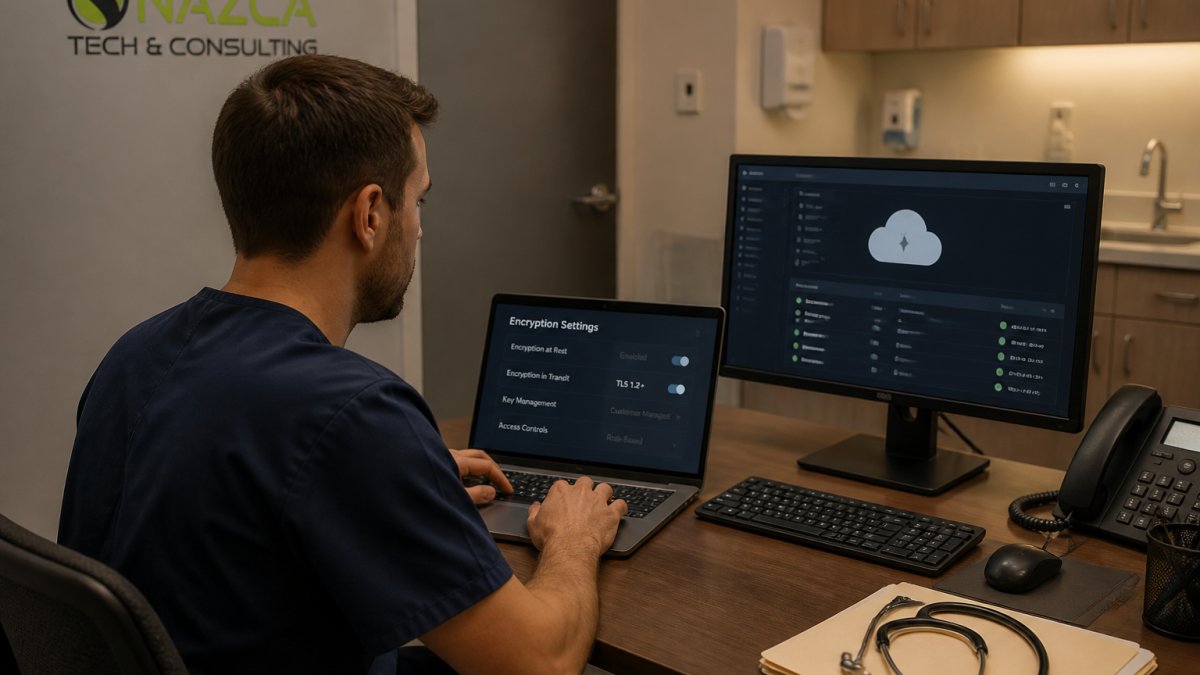
End-to-end encryption before upload is a strong safeguard for digitized medical records, per ScienceDirect research on encrypting medical data. For a deeper walkthrough, read securing patient data in cloud environments.
Step 4: Build Cloud Storage Access Control Policies
Access controls decide who sees what. Start with least privilege: every user gets the minimum access needed for their job, nothing more. Then layer on role-based access so permissions follow roles, not individuals.
Least Privilege and Role-Based Access
Multi-factor authentication is now explicitly required for cloud-based ePHI access, according to Medcurity's 2026 HIPAA cloud compliance guide. Pair MFA with quarterly access reviews and revoke accounts the day someone leaves. For policy templates covering remote staff, see our guide to HIPAA compliant remote work security policies.
Step 5: Configure Audit Logs for Healthcare Cloud Storage
Audit logs for healthcare cloud storage record who accessed ePHI, when, and from where. Without them, you cannot detect unauthorized access or prove compliance during an investigation.
Turn on logging for every cloud system, keep logs tamper-resistant, and review them on a schedule. A monthly review beats a yearly scramble.
Step 6: Test Backup, Recovery, and Incident Response
A backup you have never restored is a hope, not a safeguard, and an incident response plan nobody has rehearsed is a document, not a capability. This step is where compliance meets operational reality, and it is where the 2026 Security Rule updates raised the bar.
Prove Your Recovery Window
The 2026 rules require a 72-hour recovery window for cloud storage systems, per Medical ITG's 2026 HIPAA rules overview. Test restores quarterly and time them against your documented recovery objective. Record what was restored, how long it took, who performed it, and whether the restored data was verified as complete and usable.
A backup that restores files but not the associated access controls, audit logs, or encryption keys may leave data you cannot safely use, test the full recovery, not just the file copy.
Define the Incident Response Sequence
Your plan should name who detects, who decides, who communicates, and who preserves evidence. A workable sequence looks like this:
- Detect and triage the suspected exposure through audit logs, alerts, or staff reports.
- Contain the incident by revoking access, isolating the affected account or system, and preserving the current state before remediation.
- Investigate to determine what ePHI was involved, how many individuals were affected, and whether the data was actually acquired or disclosed.
- Notify according to the breach notification rule, with the four-factor risk assessment documented to support the decision.
- Remediate the root cause and update the risk analysis and controls accordingly.
Preserve Evidence Before You Fix Anything
Preservation is the step most often skipped under pressure. Before you delete a compromised account or wipe a misconfigured share, capture the audit logs, access records, configuration snapshots, and relevant communications. Tamper-resistant logging makes this far easier, which is why the audit-log step earlier in this guide matters.
Know the Breach Notification Timelines
Under the HIPAA Breach Notification Rule, affected individuals must generally be notified without unreasonable delay and no later than 60 days after discovery, and the Department of Health and Human Services must be notified at the same time for breaches affecting 500 or more individuals. Smaller breaches are reported to HHS annually. Your BAA should require the cloud provider to notify you promptly so your own clock is not consumed by their delay.
Rehearse and Record
Run a tabletop exercise at least annually and after any major change in your cloud environment. Keep the after-action notes, the updated plan, and the evidence of testing alongside your other compliance records. For detailed recovery strategies, read cloud storage data backup and recovery strategies.
Step 7: Document Retention, Validation, and Vendor Oversight
HIPAA requires keeping compliance records, including cloud configurations and BAAs, for at least six years from creation or last use, per Medical ITG's 2026 record-keeping standards. Build a retention policy and a validation calendar so evidence is always current.
Vendor due diligence never stops. Review your cloud provider's security posture at least annually, and confirm their BAA and controls still match your risk analysis. This is where a partner helps. Nazca Tech's cybersecurity and compliance services can help provide ongoing oversight.
| Step | What You Do | How Often |
|---|---|---|
| Risk analysis | Map ePHI and gaps | Annually |
| BAA review | Confirm contract terms | Annually |
| Encryption check | Verify at rest and in transit | Quarterly |
| Access review | Trim permissions | Quarterly |
| Log review | Scan for anomalies | Monthly |
| Restore test | Time recovery | Quarterly |
| Retention audit | Confirm six-year records | Annually |
Frequently Asked Questions
Is cloud storage HIPAA compliant?
Cloud storage itself is not automatically HIPAA compliant. Compliance depends on how the platform is configured and how your practice uses it. You need a signed Business Associate Agreement with the cloud service provider, encryption at rest and in transit, multi-factor authentication, role-based access controls, and audit logging. The provider supplies the tools, but your organization remains responsible for configuring them correctly and enforcing internal policies.
What are the mandatory security requirements for storing PHI in the cloud?
Five technical safeguards form the baseline. First, a signed BAA with every cloud vendor that touches ePHI. Second, access controls with role-based permissions and least privilege. Third, multi-factor authentication for all users. Fourth, comprehensive audit logging that records who accessed what and when. Fifth, secure transmission protocols for data in transit. Backup and disaster recovery testing belongs on the same checklist.
How long must you keep compliance records for cloud storage?
Keep all compliance-related documentation under a documented retention schedule. That includes Business Associate Agreements, cloud storage configuration records, risk analysis results, and audit log exports. Retention policies should also cover how ePHI is deleted when it is no longer needed, and how data is exported if you change vendors. Document both the retention schedule and the deletion process so an auditor can follow the trail.
Who is responsible for cloud storage security, the provider or the practice?
Both, but the practice carries the legal obligation. Cloud providers offer encryption, logging, and identity tools, yet the healthcare organization must configure security settings, manage user access, and maintain internal policies. A shared-responsibility matrix by control helps here: list each safeguard, note whether the vendor or your team owns it, and record the evidence. Review that matrix during vendor due diligence and again at each annual risk analysis.
Cloud storage compliance for healthcare is not a one-time project. It is a loop of risk analysis, controls, testing, and documentation that keeps running. That is where Nazca Tech comes in. We bring over 21 years of technology expertise, technicians trained in HIPAA compliance and ePHI security protocols, and rapid response times of one hour for remote support and three hours for on-site emergencies. Get started with Nazca Tech and put your cloud storage on a compliance footing you can prove.